
Instagram Growth Automation Tool
Download {software_name} now
Overview
Helper Tools for Instagram is a desktop-based browser extension designed to assist users in managing and growing their presence on Instagram. The software enables users to analyze follower data, track engagement patterns, and automate certain actions such as following, liking, and blocking. It is particularly useful for individuals and small brands aiming to expand their reach organically.
The tool supports public account analysis and provides functionality to export follower and following lists in CSV format, which can be used in Excel or Google Sheets for further analysis. Users can also identify common followers between two accounts, which may help in targeting potential new connections. The tool operates through a browser extension interface, integrating directly with Instagram’s web platform.
While it includes several beta features, such as mass follow/unfollow and automated liking, users are advised to exercise caution due to Instagram’s terms of service. The developer did not provide additional system requirements or performance benchmarks. The software is available at no cost, with a free tier up to 10,000 followers or following, beyond which users may consider premium access.
It is compatible with Windows, Mac, and Linux operating systems. Real-world use cases include audience research, engagement optimization, and data backup for social media accounts.
Key Features & Capabilities
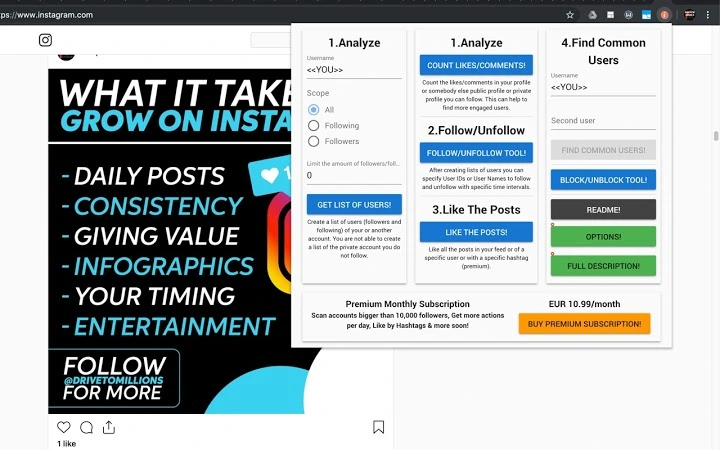
- Account Analysis – Generate a comprehensive list of followers and following for any public Instagram account, including the option to filter for private accounts the user already follows. The data can be exported in CSV format for use in Excel or Google Sheets.
- Engagement Tracking – Calculate total likes and comments on a specific account and group them by individual likers, helping users identify the most active and engaged followers.
- Mass Follow/Unfollow (Beta) – After generating a list of followers or following, users can initiate bulk follow or unfollow actions. This feature is intended to help grow a follower base by targeting users who may follow back.
- Automated Liking (Beta) – Allows users to like posts in their feed, on other profiles, or by hashtag. This feature is available to premium users and aims to increase visibility and engagement.
- Common Follower Detection – Identify shared followers between two Instagram accounts, useful for competitive analysis or collaboration opportunities.
- Mass Block/Unblock – Enables users to block or unblock a list of usernames or user IDs in bulk, streamlining account hygiene and security management.
- Data Export & Backup – Export follower and following lists for archival purposes. While not guaranteed to restore exact follow status, it provides a reference for manual re-engagement.
These capabilities are especially beneficial for content creators, digital marketers, and small business owners seeking to optimize their Instagram strategy. The tool supports both organic growth and audience research, offering insights that can inform content and outreach decisions. Users are advised to monitor Instagram’s terms of service, as automated actions may trigger temporary restrictions.
User Interface, Workflow & Performance
The software operates as a browser extension, with a popup interface that appears when the user clicks the extension icon on the browser toolbar. The UI is minimalistic, focusing on core functions such as account analysis, engagement metrics, and action initiation. Navigation is straightforward, with clearly labeled buttons and input fields.
The workflow begins with entering an Instagram username, followed by selecting the desired action—such as analyzing followers or generating a like list. The tool processes data in real time, though exact performance details were not specified. The developer did not provide information on CPU or RAM usage, nor did they share data on response times or processing speed.
The software includes built-in delays between actions to reduce the risk of triggering Instagram’s anti-bot mechanisms. In cases where errors such as HTTP429, HTTP403, or HTTP400 occur, the extension attempts automatic retries after a delay. This behavior suggests a focus on stability and resilience, though users may still encounter temporary blocks.
The overall workflow is designed to be efficient for users with moderate technical familiarity. No visual customization options were mentioned, and the interface remains consistent across supported platforms.
Compatibility & System Requirements
Helper Tools for Instagram is compatible with Windows, Mac, and Linux operating systems. The software is distributed as a browser extension with a file size of 1.2 MB. It does not require installation of additional software or plugins beyond the browser’s extension support.
The developer did not specify exact system requirements, including minimum RAM, processor speed, or browser version. Platform compatibility information is limited to the operating systems listed. No specific hardware requirements were provided.
Users should ensure their browser supports extensions and has JavaScript enabled. The software is designed to work with Instagram’s web interface, meaning it may not function if Instagram changes its site structure or implements new security measures. No updates or version-specific compatibility notes were shared beyond the release date of May 15, 2024.
Pros and Cons
Pros
- Free to use with access to core features for accounts under 10,000 followers.
- Supports data export in CSV format for use in spreadsheets and analytics tools.
- Includes beta automation features like mass follow/unfollow and automated liking.
- Offers functionality to detect common followers between two accounts.
- Designed with built-in delays to reduce the risk of temporary bans.
- Available on Windows, Mac, and Linux platforms.
Cons
- Automated actions may violate Instagram’s terms of service, leading to account restrictions.
- Exact performance and resource usage details were not provided.
- Some features are labeled as beta, indicating potential instability or incomplete functionality.
- No official support for mobile Instagram or standalone desktop app.
- Relies entirely on browser extension compatibility, which may break with site updates.
FAQ Section
Is Helper Tools for Instagram safe to use?
The tool includes built-in delays and error-handling mechanisms to reduce the risk of triggering Instagram’s anti-bot systems. However, automated actions may still violate Instagram’s terms of service, potentially leading to temporary or permanent account restrictions.
Does the software work on mobile devices?
Helper Tools for Instagram is designed as a browser extension and is intended for use on desktop browsers. It does not support mobile Instagram or standalone mobile applications.
Can I use this tool without a premium account?
Yes. The software is free to use for accounts with up to 10,000 followers or following. Premium features such as automated liking are available for users who choose to upgrade.
How often does the tool update?
The latest version was released on May 15, 2024. The developer encourages users to fill out a survey to stay informed about future updates and new features.
Is my data stored or shared?
The developer did not provide information on data storage or sharing practices. All data processing occurs locally within the browser, but users should exercise caution when handling sensitive account information.
Final Thoughts
Helper Tools for Instagram offers a powerful set of features for users aiming to analyze and grow their Instagram presence through data-driven strategies. With tools for follower analysis, engagement tracking, and automated actions, it provides a valuable resource for content creators and digital marketers. While the software is free and accessible across multiple operating systems, users should remain mindful of Instagram’s policies regarding automation.
The inclusion of built-in delays and error recovery mechanisms demonstrates a focus on reliability. The beta status of several features suggests ongoing development and potential improvements. For those seeking to optimize their Instagram strategy with minimal effort, this tool presents a compelling option.
Download {software_name} now.







